Query Simulator
The Query Simulator enables to previsualize query execution safely, avoiding any impact on production or live data. It forecasts resource usage, execution time, and optimal warehouse configuration, and identifies performance and cost optimization opportunities. This simulation process runs without consuming any Snowflake credits.
Why a Specialized Query Simulator?
Snowflake-Native Intelligence
- The Anavsan Query Simulator is built exclusively for Snowflake’s architecture and workload engine.
- It uses your Snowflake metadata to generate highly accurate predictions for cost and performance.
- Simulations are performed without incurring any Snowflake credit usage.
Simulator Highlights
- Previsualize Snowflake query behavior before running it
- Estimated credit usage, execution time and bytes scanned
- Optimal warehouse size recommendation
- Identification of cost-heavy operations
- Avoids unnecessary Snowflake credit consumption
- Helps users test, refine, and run only optimized queries in production
With Anavsan Query Simulator
- Predicts credits, runtime, and bytes scanned before running anything in Snowflake, with zero credit consumption.
- Lets you test warehouse sizes (XS–4XL) and query variations safely to find the most cost-efficient version.
- Prevents costly mistakes by exposing performance bottlenecks without touching production or actual data.
Without Anavsan Query Simulator (Direct Run in Snowflake)
- Every attempt consumes credits, making experimentation and tuning expensive.
- You only learn runtime, scans, and bottlenecks after the query impacts your warehouse.
- Misjudging warehouse size or query structure can lead to unnecessary credit burn and production slowdowns.
Access Query Simulator
Navigate to Optimization > Query Simulator. The editor opens with placeholder text.
Enter your Snowflake query
Paste or type your SQL query using standard Snowflake SQL dialect. Anavsan Query Simulator will refer to the metadata of your Snowflake account. The editor supports multi-line queries and standard SQL syntax highlighting.
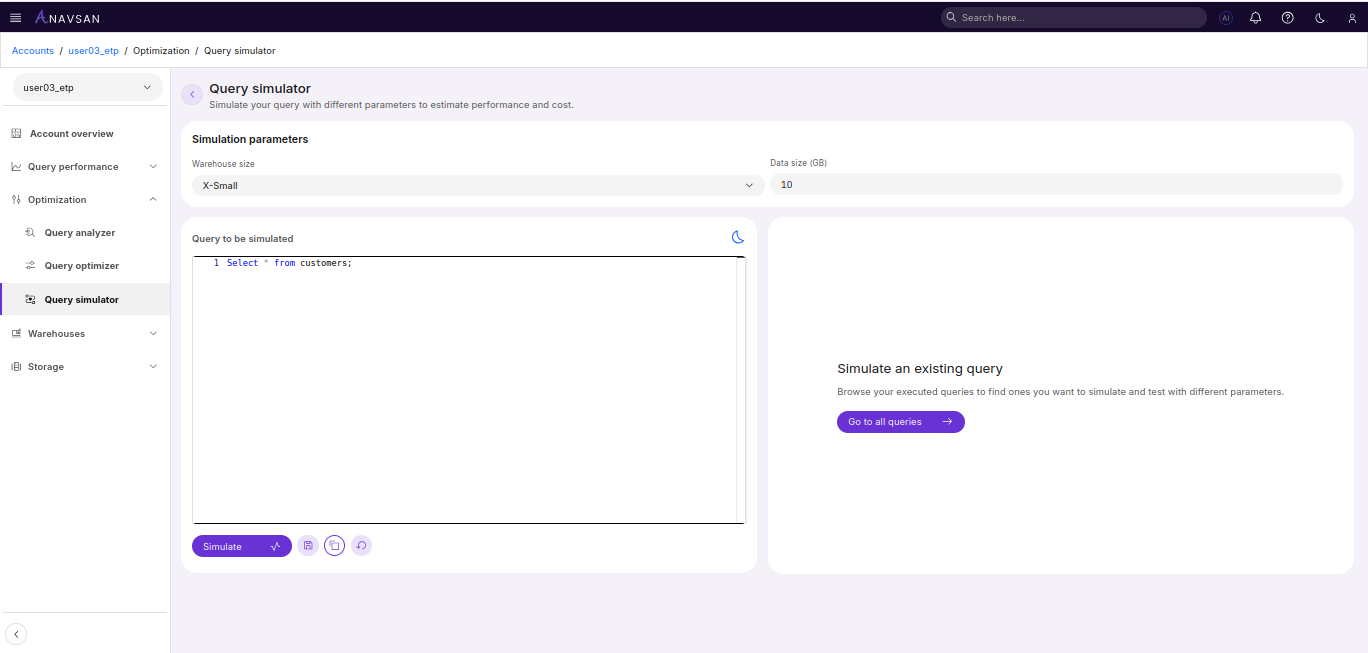
The Simulate button becomes enabled once you've entered a valid query. Click to initiate simulate.
Simulation Parameters
Warehouse Size
Choose the size of the virtual warehouse for the simulation:
- X-Small, Small, Medium, Large, X-Large, 2X-Large, 3X-Large, 4X-Large
Data Volume (GB)
- Estimate how much data your query will process. This helps the simulator give accurate credit and time estimates.
Start with the warehouse you usually run your queries on, then explore larger/smaller sizes to see potential cost and performance changes.
Simulated Result
Simulation typically completes in 30–60 seconds and displays comprehensive Snowflake-specific findings.
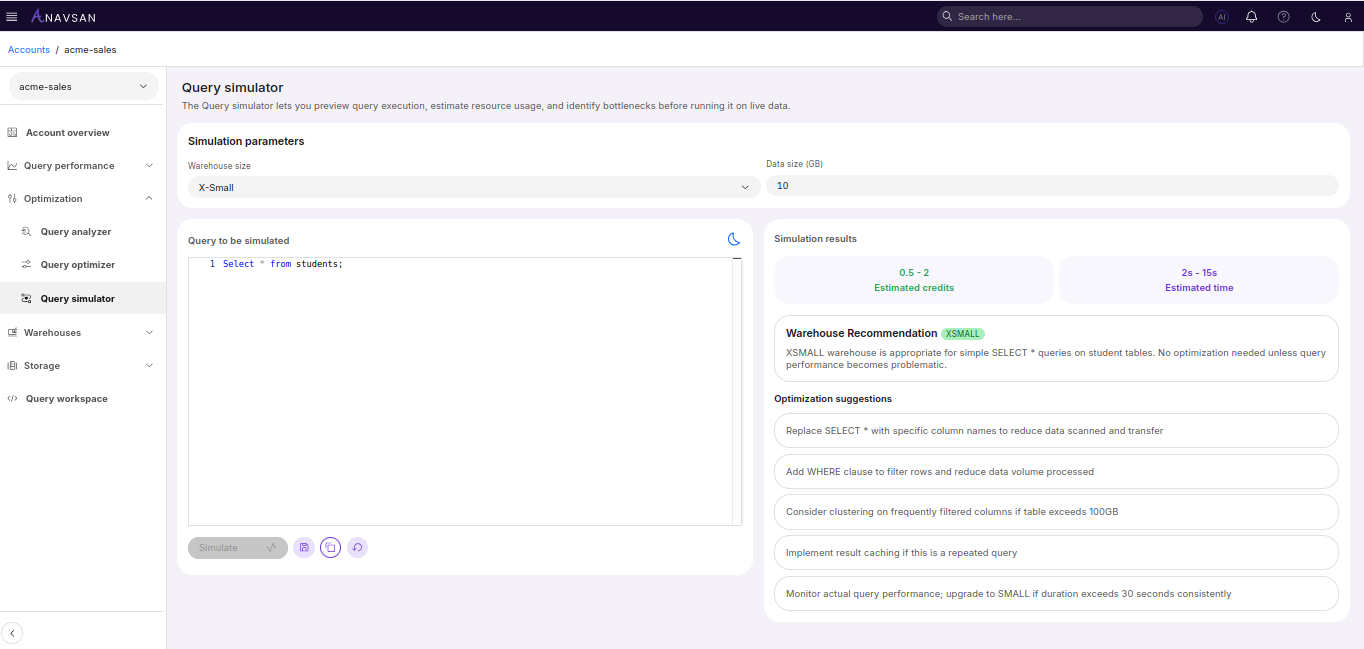
Estimated credits Shows the projected credit consumption range for the query execution.
Estimated time Displays the expected query execution duration.
Warehouse Recommendation Provides a recommended warehouse size based on query complexity and data volume, with an explanation of why the size is appropriate for your workload.
Optimization suggestions Lists actionable recommendations to improve query performance, reduce costs, and optimize resource usage.
Action Buttons
Below the editor, action buttons provide simulation and management functionality.
| Button | Description |
|---|---|
| Simulate | Previews query execution to estimate resource usage and performance |
| Save | Saves query to Query Workspace for future reference |
| Copy | Copies query to clipboard |
| Reset | Clears the editor and simulation results |